

First, yay!
We love the business level because you have more flexibility to create within the digital product maker without all those pesky limitations on # of products. You will also receive more digital product templates and more copyshop genius!
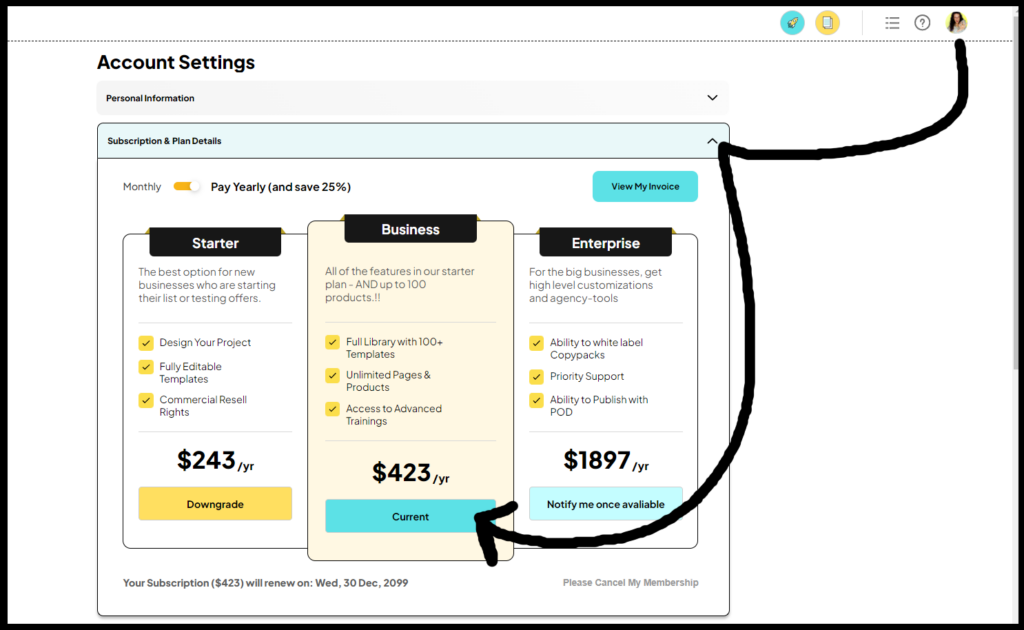
Here is how you upgrade your Pagewheel account:
- Click on the ACCOUNT icon in the upper right corner of your Pagewheel dashboard page (it looks like a person’s head and shoulders).
- Select “Subscription & Plan Details”.
- Choose the “Upgrade” button for the plan you desire…right now, that would be “Business” and hopefully soon our “Enterprise” level will be available.
- Fill out the payment information on the next page and click the “Upgrade” button.
How to get on the waiting list for Enterprise:
- Click on the ACCOUNT icon in the upper right corner of your Pagewheel dashboard page.
- Select “Subscription & Plan Details”.
- Click on the “Notify me when available” button under Enterprise.
- Fill out the form that appears and click “OK”